Firmware Maintenance - neoVI
Main
Overview
Firmware for the hardware is stored in the software used to connect to the hardware. Vehicle Spy, neoVI Hardware Explorer, and custom applications using the icsneo40.dll and programming API are applications that will update the firmware in the device. By default firmware is automatically loaded if the connecting software detects a different version in the hardware than what the software has.
Your Current Firmware
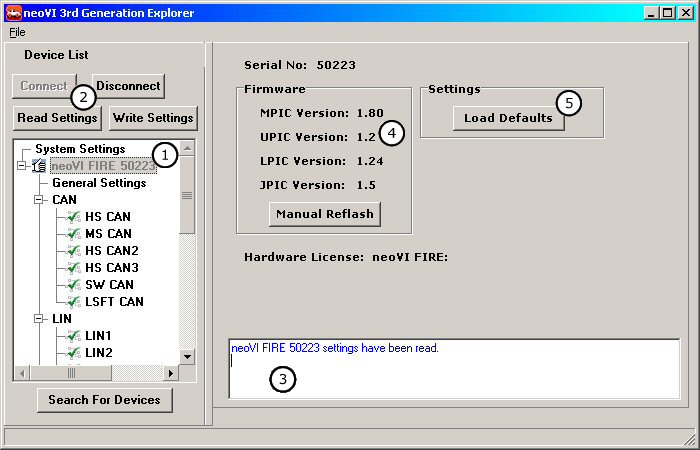
When you connect to your hardware, neoVI Hardware Explorer will list the current firmware in the neoVI device (Figure 1: Bubble 4). If the firmware does not match the firmware in the software, the version number will be flagged red. If automatic firmware updates are disabled, firmware can be uploaded using the "Manual Reflash" button. After updating the devices firmware, check your networks settings to ensure that they are correct.
Figure 1 - neoVI Hardware Explorer
| neoVI Documentation - (C) Copyright 2000-2020 Intrepid Control Systems, Inc. |
Last Update: Monday, March 09, 2009