
Welcome to the ASAP2 Editor Help Documentation
|
Welcome to the ASAP2 Editor Help Documentation |
This documentation describes the features of the ICS ASAP2 Editor software application.
Overview (refer to Figure 1)
Various map file formats generated from source code compilation define symbols in an ECU's memory.
The ICS ASAP2 Editor converts map files into ASAM standard A2L files that define ECU measurements, calibrations, and diagnostic information.
The A2L files are used by the ICS Vehicle Spy MEP feature to translate CCP/XCP message traffic with the ECU into user friendly displays and dialogs that aid calibration and diagnostic development.
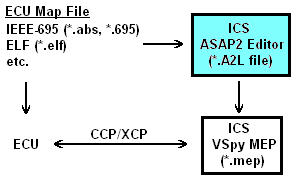
Figure 1: Overview of how the ASAP2 Editor supports Vehicle Spy and ECUs that use CCP/XCP.
The ASAP2 Editor consists of a main toolbar along the top of the window and three viewing areas.
A common way to use the editor is to first load an ECU map file and see its symbols in a +/- tree in the Symbol area  .
The symbols can then be added to an A2L file by dragging and dropping them onto the tabs in the A2L item area
.
The symbols can then be added to an A2L file by dragging and dropping them onto the tabs in the A2L item area  .
The Messages area
.
The Messages area  will display any warnings or errors after building or generating the A2L file.
Another way to use the editor is to simply import previously created A2L files, edit their contents in the A2L item area, and generate the modified A2L file.
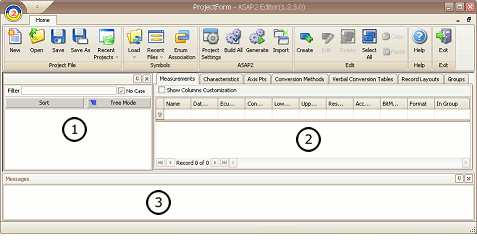
Figure 2: General layout of the ASAP2 Editor.
&
can be redocked into other locations within the editor by dragging and dropping their titlebars.
These areas can also be pinned to the sides of the editor to disappear as named tabs when not in use and reappear when the mouse is hovered over the tab.
Acronyms
Some abbreviations coming from specifications are used in the ASAP2 Editor and these helpfiles.
Here's a short list of descriptions to help understand the acronyms being used:
Contact Information & Useful Links
ICS Contact Information
On the web:
 ASAP2 Editor Documentation - (C) Copyright 2021 Intrepid Control Systems, Inc. ASAP2 Editor Documentation - (C) Copyright 2021 Intrepid Control Systems, Inc. |
Last Update: Wednesday, June 17, 2009