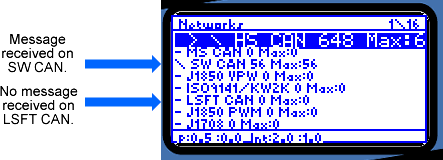
Figure C-12: Network Info Screen
neoVI PRO Stand Alone Mode - Vehicle Spy Mini Mode
Network Info Screen
The Network Info screen displays the current message rate in messages per second.
It also display the maximum message rate available. When viewing the Network
Info screen, a "-" to the left of a network name indicates that no message
has been received on that network. A "/" indicates that a message has been
received. The "/" toggles back and forth each time a messages is received.
Figure C-12: Network Info Screen
| < Previous | Back to Table of Contents | Next > |