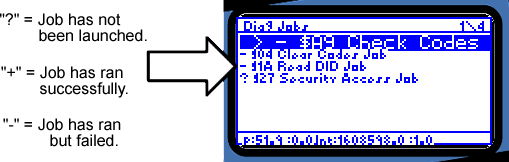
Figure C-9: Available Diagnostic Jobs List
neoVI PRO Stand Alone Mode - Vehicle Spy Mini Mode
Launching Diagnostic Jobs
Figure C-9: Available Diagnostic Jobs List
To perform Diagnostics using
neoVI PRO, you must first setup desired jobs using Vehicle Spy. Save and load
the setup file in neoVI PRO. Select Diag Jobs from the Vehicle Spy Summary
screen. If multiple jobs have been defined, select the one you wish to run
using the directional pad. Click  to
launch the job and move to the results screen. The results screen displays
resulting diagnostic data.
to
launch the job and move to the results screen. The results screen displays
resulting diagnostic data.
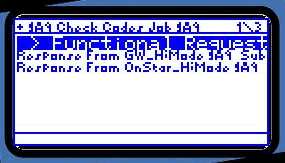
Figure C-10: Diagnostic Results Screen
Alternately, you may wish to launch a diagnostic
job without moving directly to the results screen. To do this, simply highlight
the desired job from the Diagnostic Job List and click the  button.
The job will run, but neoVI PRO will display only the Diagnostic Job List.
button.
The job will run, but neoVI PRO will display only the Diagnostic Job List.
To save job data from either the Diagnostic Job
List screen or the Diagnostics Results screen, press the  button.
| < Previous | Back to Table of Contents | Next > |