 |
Bus Decoder (Normal Mode) |
Overview
|
Bus Decoder (Normal Mode) |
Overview
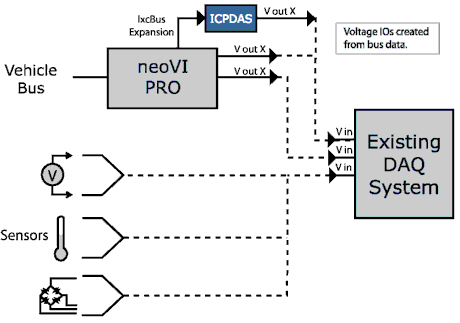
As previously mentioned, the Bus Decoder operating mode takes signals and converts them to voltages. These voltages are put out on specified pins, ready to be measured with standard measuring devices. Some standard measurement device include data acquisition equipment, voltmeters, and oscilloscopes.
Figure
A-1: Bus Decoding
Standard Setup Procedure:
1) Create a Vehicle Spy Setup file using Vehicle Spy.
a) Open Vehicle Spy.
b) Select Tools and then neoVI PRO Setup.
c) Select “Bus Decoder (normal)” from the dropdown.
d) Open Message Editor (click on View, Vehicle Networks, and then Message Editor).
e) Add messages and decode signals. Make sure signals include Min and
Max Ranges. Vehicle Spy uses these value to scale to voltage.
f) Open neoVI PRO Emulator (click on Tools and then neoVI PRO Emulator).
g) Verify that signals setup in Message Editor are listed in the Signal Selection
Screen. Attach signals to specific channels. For more detail on this, see next
topic below.
2) Save setup file. Go to File and then Save.
3) Copy your file to neoVI PRO’s compact flash card.
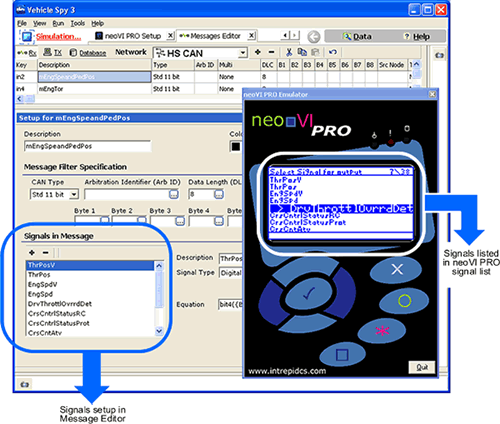
Figure A-2: Signals Setup in Message Editor are display
in neoVI PRO.
| < Previous | Back to Table of Contents | Next > |