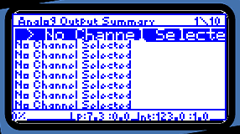
Figure A-3: Analog Output Summary List
neoVI PRO Stand Alone Mode - Bus Decoder (Normal Mode)
Standard Screens and How to Maneuver
1) Analog Output Summary: This screen lists available analog outputs, 1 through 10. If no signal has been associated with an output, it will read “No Channel Selected”. If a signal has been selected, the signal name will be listed here. Use the directional pad to move up and down in the Analog Output Summary list. The output selected will be highlighted in blue.
Figure A-3: Analog Output Summary List
2) Press the  button to select an output. If a signal is selected, you will see a Channel
Summary Screen. Please see labeled figure below for details.
button to select an output. If a signal is selected, you will see a Channel
Summary Screen. Please see labeled figure below for details.
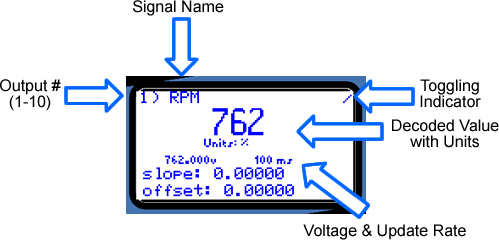
Figure A-4:Channel
Summary Screen
While viewing a channel summary, use the directinal pad left and right buttons to view scalings for different voltages. (Easily set up you DAQ system!)
Use the directional pad up and down buttons to scroll through channels without returning to the Analog Output Summary screen.
3) If an output with “No Channel Selected” was
selected, the Channel Summary Screen will ask you to press the button
once more. An Available Signals Screen will open, displaying all signals setup
in the Message Editor. Maneuver through the list using the directional pad
and then press the button
to select a signal for the output.
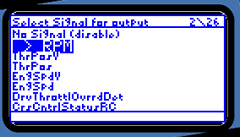
Figure A-5: Available Signals Screen
*At any time, pressing the  button
will take you back to the previous screen.
button
will take you back to the previous screen.
| < Previous | Back to Table of Contents | Next > |