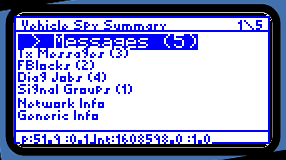
Figure C-1: Vehicle Spy Summary
neoVI PRO Stand Alone Mode - Vehicle Spy Mini Mode
Vehicle Spy Summary Screen
Figure C-1: Vehicle Spy Summary
This screen gives you
an overview of the status of neoVI PRO when in Vehicle Spy Mini Mode. A heading
for each function is listed. To the right of each heading, in parentheses,
is a number that indicates the number of messages, signal groups, function
blocks, and diagnostic jobs that have been set up. Use the directional pad
to move from heading to heading. When the desired heading is highlighted, click
the  to
make a selection.
to
make a selection.
| < Previous | Back to Table of Contents | Next > |