

|
|
|
|
Vehicle Spy
To use neoVI PRO in Stand Alone mode, you must first create setup files in Vehicle Spy. Basic Vehicle Spy skills can be learned by completing Vehicle Spy Tutorials 1, 2, and 3. (Tutorials and many helpful examples can be found in the Vehicle Spy Help Documentation.) These tutorials encourage familiarity with the Vehicle Spy user interface as well as teach skills such as monitoring messages, transmitting messages, decoding signals, and constructing function blocks.
While using neoVI PRO for Bus
Decoding,
familiarity with the Message Editor view and
signal setup will be especially important. Message Editor is accessed by selecting “View” from
the menu at the top, then “Vehicle Networks”, and then “Message
Editor”. The signals you setup here will appear in the Available Signals
list in neoVI PRO.
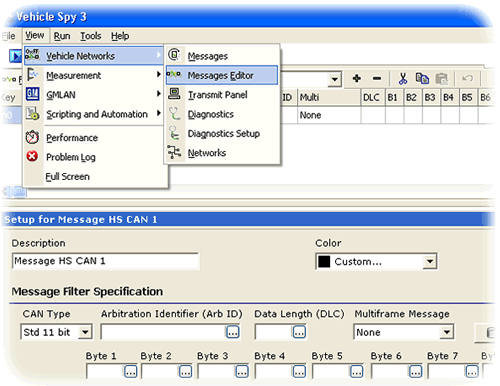
Figure - Use Message Editor in Vehicle Spy to setup messages and signals.
Keep in mind that the Vehicle Spy 3 Setup file is always running no matter what option you select. For example, in "Bus Decoder Mode" you can still have Function Block scripts and Function Block logging operational.
| < Previous | Back to Table of Contents | Next > |