
|
WN Website: Device Commands |
Table 1: Device Commands
Last Update:
Tuesday, January 29, 2013
Clicking on a device in the Vehicle List takes you to the Device page.
The upper part of the page displays detailed information about the device.
The lower part of the Device page has many commands as shown in Figure 1 and described in Table 1.
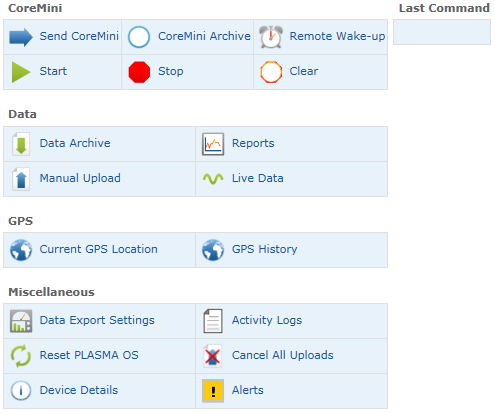
Figure 1: The lower part of the Device page has many commands.
Device Command
Description
CoreMini
Send CoreMini
Sends a VS3ZIP script file from your PC to the device and starts it.
(This overwrites any current script in the device.)
CoreMini Archive
An archive of VS3ZIP script files previously sent to the device.
Remote Wake Up
Sends a wake up to the device.
Start
Starts the script currently in the device.
Stop
Stops the script running in the device.
Clear
Clears the script from the device.
Data
Data Archive
Review data log files uploaded from the device to the website.
Reports
Review diagnostic trouble code (DTC) reports.
Manual Upload
Uploads data log files from the device to the website.
Live Data
Watch live signal data from the device.
GPS
Current GPS Location
Shows the current location of the device on a map.
GPS History
Shows where the device has been over time using a map and a table of time stamped coordinates.
Miscellaneous
Data Export Settings
Selections for the data export file format.
Activity Logs
Review Wireless NeoVI realtime activity logs.
Reset PLASMA OS
Resets the PLASMA Linux operating system.
Cancel All Uploads
Stops all current and pending data log uploads from the device to the website.
Device Details
Shows the device IP address and version numbers of software components.
Alerts
Alerts from the device that may require further attention.
 neoVI PLASMA Documentation - (C) Copyright 2019 Intrepid Control Systems, Inc.