
|
Standalone Logging Collection Start Options |
In VehicleScape DAQ the Standalone Logging of a Messages or Bus Query collection has Start Options described in Table 1 and shown in Figure 1.
Table 1: Standalone Logging Collection Start Options
Collection Start Option
Description
Immediately
In this collection, start logging data immediately after power up.
This enables a Finish After Messages or Expression.
When Expression is True
In this collection, start logging data after the expression is true.
This enables a Finish After Messages or Expression.
Using Trigger
In this collection, start logging data after an expression action.
This enables setup of a Pre/Post Collection or One Shot Report.
Trigger when expression is true
In this collection, start logging data after the expression is true for a selected time.
Trigger when expression changes
In this collection, start logging data after the expression changes from its current value.
Trigger when expression increases/decreases
In this collection, start logging data after the expression changes from its current value by some chosen amount.
Manual Trigger
In this collection, start logging data if the neoVI MOTE or other pendant button is pressed.
Always DAQ
In this collection, always request DAQ items even if they are not being logged.
Requested DAQ items are diagnostic signals that get polled from ECUs like DTCs, PIDs, ISO 14229 IDs, and MEP A2L file data items.
This must be enabled if the Start expression uses any requested DAQ item.
The following settings affect ALL Standalone Logging collections
Reporting Options
Options for physical logger feedback and Live Data reporting to a Wireless NeoVI website.
Power Management
Logger sleep and wakeup selections are made here.
Generate
Generates the final script and opens a dialog to send it to ICS hardware that supports standalone logging.
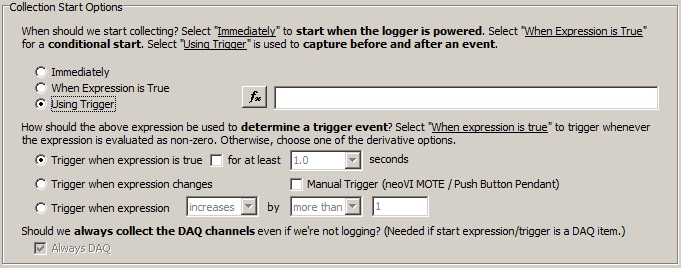
Figure 1: The Standalone Logging Collection Start Options.
 neoVI PLASMA Documentation - (C) Copyright 2019 Intrepid Control Systems, Inc. neoVI PLASMA Documentation - (C) Copyright 2019 Intrepid Control Systems, Inc. |
Last Update: Friday, May 3, 2013